By Asif at Diginuance · Last updated 2026-05-21 · 11 min read
TL;DR
- Yes — you can build, host, rank, and earn from a real business website using Claude Code with zero coding background.
- Realistic first-year out-of-pocket: $80–$300 total (almost all of it domain + hosting).
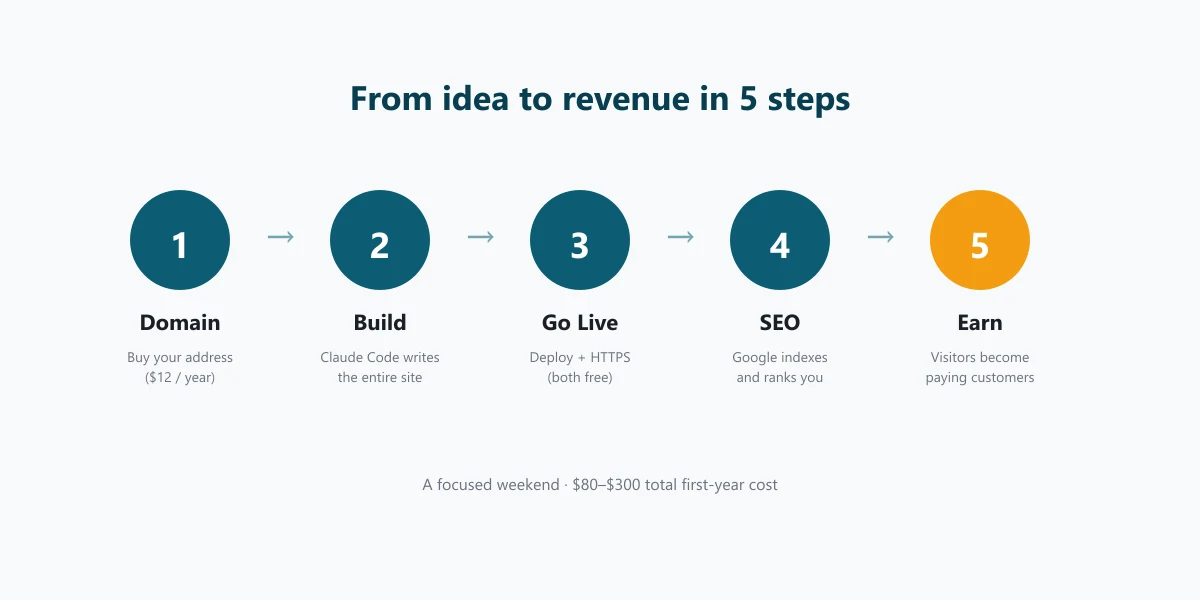
- Time to launch: a focused weekend if you push, two or three evenings if you sleep on it.
- Claude Code does roughly 95% of the technical lift; you do the business decisions and the writing.
- Monetize through services, products, ads, or affiliate links — pick whichever fits how your business actually makes money.
I run a small software agency in Rawalpindi. We build SaaS, web, and mobile apps for clients in the US, UK, and EU. So when I say I built my own business website using Claude Code — without writing a line of code myself — read that as a real claim, not a marketing slogan. This guide walks you through the same five steps I followed, in order. No prior coding required. Every tool I touched, every dollar I spent, and the mistakes I’d skip if I started over today.
If you can write a clear email, you can build a business website with Claude Code in 2026.
What you’ll build, in how long, with what
You’ll end up with a real, public-facing, professional-looking business website — your own domain, fast hosting, working contact form, payment buttons if you need them, and a structure search engines actually understand. Not a drag-and-drop page. A proper site that competes.
What you’ll have at the end
A live website at yourbusiness.com with: a homepage, an About page, a Services or Products page, a Contact form that emails you, and a Blog — all designed in your colours, written in your voice. HTTPS turned on, mobile-responsive, indexed by Google, and (if you want it) accepting card payments via Stripe. Total time invested: 12–20 hours spread over your first weekend.
What you won’t get (and when to hire help)
You won’t get a custom CRM, a deep ERP integration, or a complex multi-tenant SaaS by the end of this guide. That’s a different scope — that’s when you call our team in Rawalpindi or another agency. The DIY path stops being the right path the moment you need someone awake at 3am when something breaks.
Step 1 — Buy a domain and pick hosting (the only real money you spend on day one)
This is the only step where you pull out a credit card before any code exists. Do it first; everything else assumes you’ve done it.
How to pick a domain name in 10 minutes
A domain is your address on the web — yourbusiness.com. Keep it short, easy to spell on a phone call, and ideally .com because that’s still what people instinctively type in 2026. Buy from Namecheap, Porkbun, or Cloudflare Registrar — all three sell domains roughly at-cost ($10–$15 per year). Avoid GoDaddy upsells if you don’t want to argue with renewal-price gotchas later. Don’t spend a week on this — your business name is your domain name. Move on.
The 3 hosting options that work with Claude Code
Hosting is the computer your website lives on. You have three sensible choices in 2026, depending on what your site is:
| Site type | Best host | Monthly cost | Why |
|---|---|---|---|
| Marketing site, blog, portfolio | Cloudflare Pages | $0 | Free tier handles real traffic. Claude Code deploys to it with one command. |
| WordPress site (blog + plugins) | Bluehost or DreamHost | $3–$10 | Shared hosting with WP-CLI access. Pairs cleanly with Claude Code over SSH. |
| Web app with logins or a database | Vercel + Supabase | $0–$25 | Free tiers carry you to your first ~10,000 users. |
If you’re starting from scratch and unsure, start with Cloudflare Pages — it’s free, it’s fast, and you can migrate later if you outgrow it. I host a few of our smaller sites on Bluehost shared hosting because they’re WordPress and the team is already inside that account; Claude Code drives WordPress over SSH beautifully.
What the first $20–$40 buys you
Domain ($12) + the first month of hosting ($0–$15) + a Pro Claude Code subscription if you want unlimited usage ($20). That’s your full upfront cost to start. No agency invoice. No retainer. No five-figure quote. When a friend launched her consultancy site this way last month, she spent $34 before her first visitor landed. Six weeks later she’d closed two retainer clients off it.
Step 2 — Install Claude Code and ask it to build the site
This is the step that surprises everyone. You write what you want in English; Claude Code writes the actual website. You watch it happen on screen and confirm or redirect.
Installing Claude Code in 10 minutes (Mac, Windows, or Linux)
Claude Code is Anthropic’s official command-line tool — it runs on your computer, talks to the same AI that powers Claude.ai, and can read and write files, run commands, and check its own work. Install it from the official site. On Windows it’s a one-click installer; on Mac and Linux it’s a single command in your Terminal. You don’t need to understand the terminal to use Claude Code — you just need to be willing to type one sentence and press enter.
The first prompt — and why your prompt matters more than your design taste
Open Claude Code in the empty folder where your website will live and give it a prompt like this:
Build a clean, modern marketing website for my business called
"[Your Business Name]". We do [what you do] for [who you do it for].
Use [your two brand colors] as the palette. The site needs a homepage,
About, Services, Blog, and Contact page. Make it mobile-responsive,
fast, and ready to deploy to Cloudflare Pages. Use Astro for the
framework. Don't use any "tech" cliché design — make it look like a
business, not a startup.
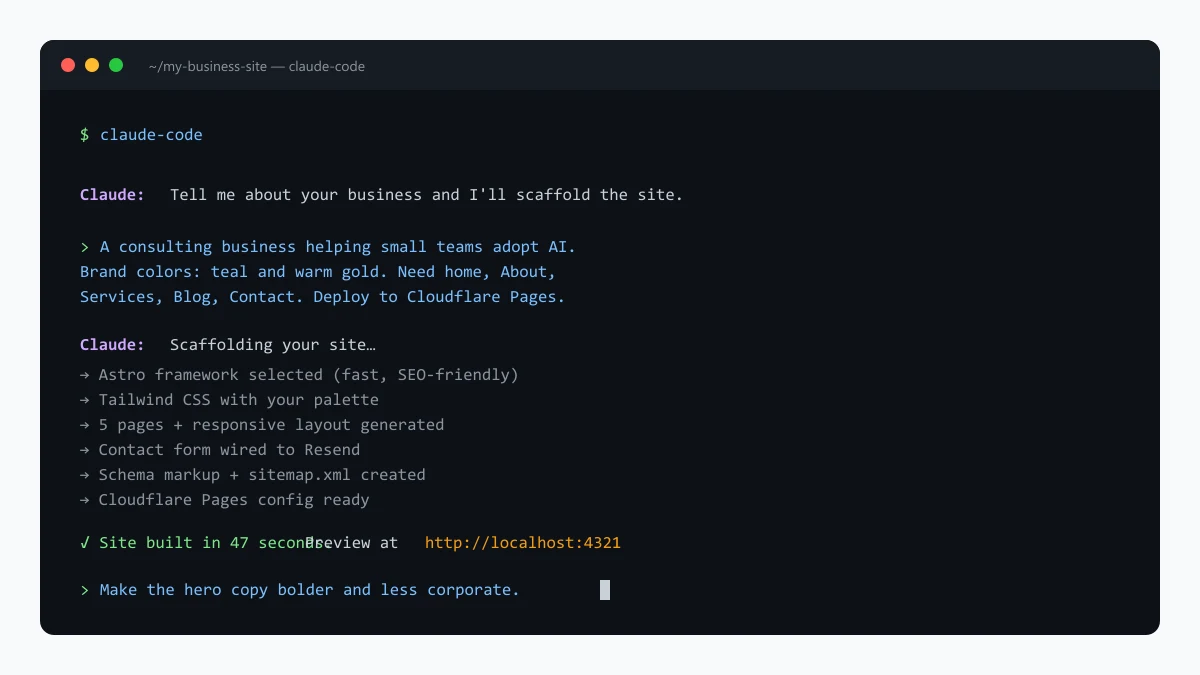
The more specific your prompt, the better the first draft. Vague prompts produce generic results. Tell Claude Code your audience, your colours, your competitors you do or don’t want to look like, and the framework you’ve heard of (Astro for static sites, Next.js for apps, WordPress if you already have a hosting account). Claude Code scaffolds the entire project in 30–60 seconds.
Iterating until the site looks the way you want
The first draft is about 80% there. Then you say things like “the hero feels generic — write it in first person and lead with the outcome I deliver, not the service I sell” or “replace the stock photos with simple SVG illustrations in our brand colours.” Claude Code edits the site in place and you refresh the preview. Repeat until it looks right. Most people land on a site they’re proud of in 4–8 rounds of feedback — roughly two hours of conversation. The bottleneck is your decisions, not the tooling.
Step 3 — Push the site live so the world can actually see it
A site sitting on your laptop helps no one. Going live means putting the files on a server with your domain pointed at it. Claude Code does almost all of this for you.
Asking Claude Code to deploy it for you
Deploy this site to Cloudflare Pages. Set up the GitHub repo if needed
and connect it. Walk me through any browser steps I need to do.
Claude Code creates the GitHub repository, pushes your code, connects Cloudflare Pages, and triggers the first build. Two or three minutes later, you have a live URL — something like your-site.pages.dev. You haven’t paid Cloudflare a cent. If your site is WordPress, the equivalent is asking Claude Code to upload the theme and plugins via SSH; we do that on Bluehost for the projects in our portfolio using exactly this pattern.
Pointing your domain at the site
In your domain registrar, open the DNS settings and add the two records Cloudflare Pages tells you to add. Or — easier — transfer your domain’s nameservers to Cloudflare and let Cloudflare auto-configure everything. DNS propagation takes 10 minutes to an hour. Get coffee. Come back. Your business address is live.
Getting the lock icon (HTTPS) for free
The padlock in the browser bar is HTTPS — visitors and Google both expect it. Cloudflare turns it on automatically, free, forever. If you used a WordPress host, the host has a one-click “Install SSL” button. Either way, you don’t need to know what an SSL certificate is. You just need it on. Confirm by typing https://yourbusiness.com and seeing the lock.
Step 4 — Set up SEO so Google can find you
Being live isn’t being found. Search engine optimisation (SEO) is the layer that gets you from “anyone could see it if they knew the URL” to “people typing relevant queries actually land on you.” Claude Code handles most of the technical SEO automatically; the rest is content discipline.
The 5 SEO non-negotiables
Every page needs: a clear title tag (50–60 characters, including your main keyword), a meta description (140–155 characters, written like an ad), one H1 heading per page that matches the title, alt text on every image, and internal links between related pages. Claude Code writes all of it on request: “audit my site for missing meta descriptions and alt text, then fix them.” This is the same recipe we use when we audit clients’ SEO at Diginuance.
What Claude Code can do for SEO (and what only you can do)
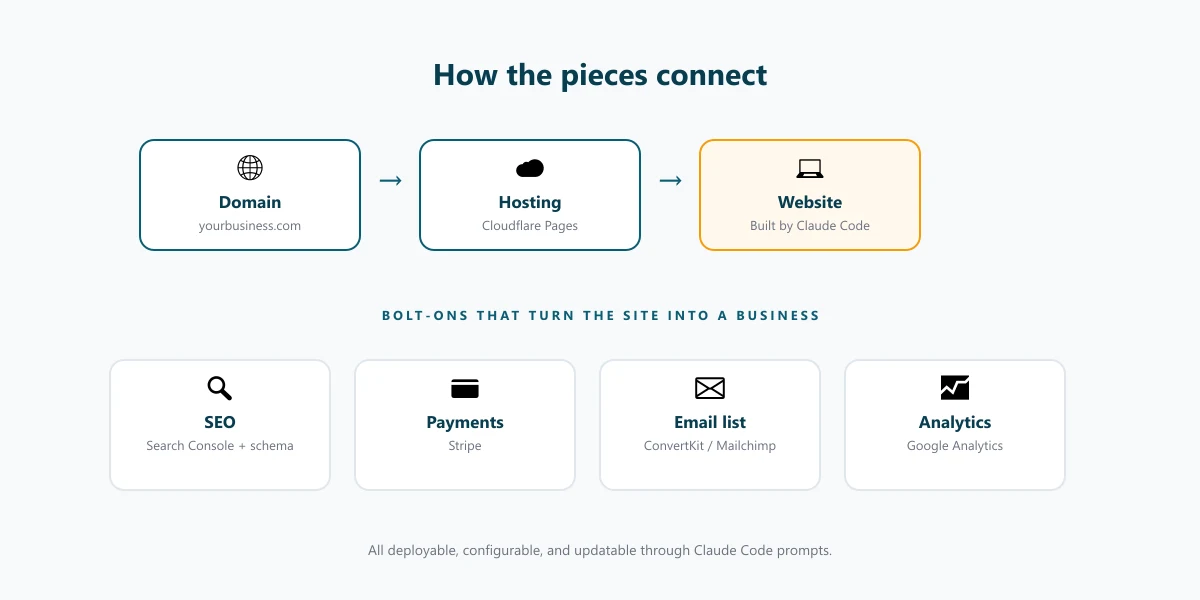
Claude Code handles the mechanical parts — page titles, meta descriptions, schema markup (JSON-LD), sitemap, robots.txt, image alt text, internal linking, and walking you through Google Search Console submission. What only you can do: write genuinely useful content, and earn backlinks from other sites. Tools don’t rank. Useful content people link to ranks. That’s the part nobody can shortcut for you.
Step 5 — Turn the website into a money-making business
A live, found website is still a brochure until someone hands you money through it. Pick one of the four paths below and wire it up before you obsess about design.
The 4 ways a small-business site actually makes money
- Services (consultants, agencies, freelancers): a working contact form and clear pricing. Setup: 1 hour. First-month earnings: $500–$5,000+ from a single client.
- Products (physical goods, ebooks, courses): Stripe checkout + a fulfilment plan. Setup: 4–8 hours. First-month: $50–$1,000.
- Ads (high-traffic content sites): one hour to install; 6+ months to earn anything meaningful. First-month: $0–$50.
- Affiliate (niche review and how-to content): real review honesty + audience trust. Setup: 2 hours. First-month: $0–$200.
If you’re a consultant or agency, services is the default and the path to revenue is shortest — a working contact form and a clear list of what you sell. That’s it. Don’t build a storefront if you don’t sell products. Don’t put ads on a site that gets 30 visitors a day.
Wiring up payments with Stripe in under an hour
For products or paid services, ask Claude Code: “add a Stripe checkout to my Services page that sells the ‘Strategy Call’ package for $200.” It’ll set up the Stripe payments integration, the success/failure pages, and the email confirmation. You sign up at stripe.com, paste two API keys into the file Claude Code points to, and you’re accepting cards. Stripe takes 2.9% + 30¢ per transaction. No monthly fee. No setup fee.
Capturing emails so you can come back to visitors who didn’t buy
Most first-time visitors don’t buy. An email list lets you come back to them later when they’re ready. Add a free Mailchimp, ConvertKit, or Buttondown form to your site (Claude Code wires it up in a single prompt) and put it in the footer plus one mid-page placement. Even 200 emails from your first three months of traffic is a real asset — that’s the audience you announce to when you launch your next service.
What it actually cost me — and what I’d do differently next time
I keep a spreadsheet for every domain we run. Here’s the honest first-year breakdown for a Claude-Code-built marketing site, no padding.
The honest 12-month cost breakdown
| Line item | Cost (USD) | Notes |
|---|---|---|
| Domain (.com) | $12 | Namecheap, year one |
| Cloudflare Pages hosting | $0 | Free tier covers ~100k requests/day |
| Claude Code Pro subscription | $0–$240 | Free tier worked for me; Pro is $20/mo if you build a lot |
| Stripe transaction fees | 2.9% + 30¢ per sale | Only when you earn |
| Email service (ConvertKit free) | $0 | Free until 1,000 subscribers |
| Optional logo design | $50–$150 | Fiverr or 99designs |
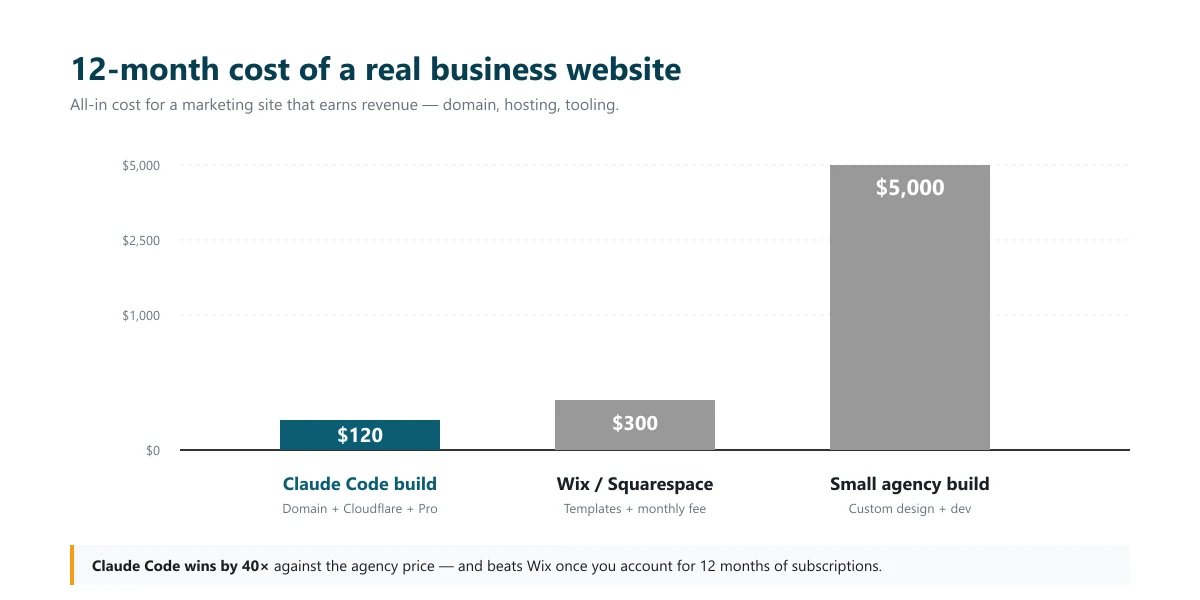
| Total year-one out-of-pocket | $62–$402 | Most sites land around $80–$120 |
Compare that to the $2,000–$10,000 range a typical agency quotes for the same scope. The difference goes into your business — or your kids’ college fund.
Three mistakes I’d skip if I started over today
One: I spent two evenings tweaking the homepage before I had any visitors. Should have shipped at 70% polish and let visitor feedback drive the rest. Two: I wired up Stripe before I had a thing to sell — wasted afternoon. Decide what you’re selling, then build the checkout. Three: I didn’t install Google Search Console until week three. Install it on day one — you’ll lose three weeks of search data otherwise.
If you find yourself spending more time supervising Claude Code than working on the business itself, that’s the moment to bring in a developer. Our team works on exactly this kind of bridge work — the place where DIY runs into a wall and a senior engineer for a few days unblocks everything. We’ve done it for SaaS founders, e-commerce shops, and one client who’d built an entire app with AI and just needed advanced infrastructure work to make it production-grade.
FAQs
Do I need to know how to code to use Claude Code to build a website?
No. You write English; Claude Code writes the code. You read what it produces and confirm or redirect — but you never have to write code yourself. If you can write a coherent paragraph describing what you want, you can build a business website with Claude Code. The skill you’re learning is being specific about what you want, not programming.
How much does it cost to build a business website with Claude Code in 2026?
Most people spend $80–$300 in their first year, almost all on domain and hosting. Claude Code has a free tier; a Pro subscription at $20 a month is optional. Compare that to the $2,000–$10,000 a small agency typically quotes for the same scope, and you can see why this approach is catching on among solo founders.
Where should I host a website built with Claude Code?
For a marketing site or blog, Cloudflare Pages (free, fast, beginner-friendly). For WordPress, Bluehost or DreamHost at $3–$10 a month. For a web app with a database, Vercel paired with Supabase. Claude Code can deploy to any of them; the choice depends on what kind of site you’re building, not on Claude Code itself.
Will a website built with Claude Code rank on Google?
Yes. Google ranks websites, not the tools that made them. What matters: page speed, content quality, schema markup, internal links, mobile-friendliness, and time. Claude Code handles the first five competently. Time and content quality are on you — no different from how it would be with a hand-coded site or an agency build.
Can I really make money from a website built this way?
Yes — and often faster than from a hand-coded site, because you’ll ship more. The website is a sales channel; how much it earns depends on what you sell, who you sell it to, and how clearly the site communicates value. The technology is no longer the bottleneck for any small business in 2026. Decisions and content are.
How long does it take to launch a business website with Claude Code?
A focused weekend gets you live. A polished version with SEO set up, payments wired, and a working email-capture form takes two to three weeks of evenings. Most people stretch the timeline longer than necessary because they hesitate on decisions — what to sell, what to charge, what to say on the homepage — not because the build is slow.
When does the DIY approach break down — and when should I hire help?
Three triggers. One: when traffic is high enough that an hour of downtime costs more than a day of a developer’s time. Two: when you need integrations Claude Code’s defaults can’t easily reach — a custom CRM, a legacy API, an ERP. Three: when you’re spending more time supervising Claude Code than working on the business. At that point you’ve outgrown DIY; an experienced engineer for a week saves you a month. That’s also when hiring outside help starts paying for itself.
If you’re ready to launch but realise mid-build that you’ve hit one of those triggers — or you simply want a second pair of eyes before you go live — book a 20-minute scoping call with our team at Diginuance. We’ll tell you honestly whether you still need us, or whether you’re closer to done than you think.